
When you first set up Google Search Console, Google asks you to choose between two property types: Domain or URL Prefix. It may seem like a small technical detail, but this choice plays a major role in how accurately your website’s SEO performance is tracked over time.
Many site owners don’t realize there’s a problem until months later, when they notice missing traffic data, incomplete indexing reports, or gaps in search visibility insights. In some cases, valuable organic search information is being recorded under a different version of the website that was never added correctly.
That’s why choosing the right property type from the beginning matters. A proper setup helps ensure your Search Console reports reflect the full picture of how your website performs in Google Search.
In this guide, we’ll break down the difference between Domain and URL Prefix properties in a simple, practical way, so you can confidently choose the best option for your website and avoid common SEO tracking mistakes.
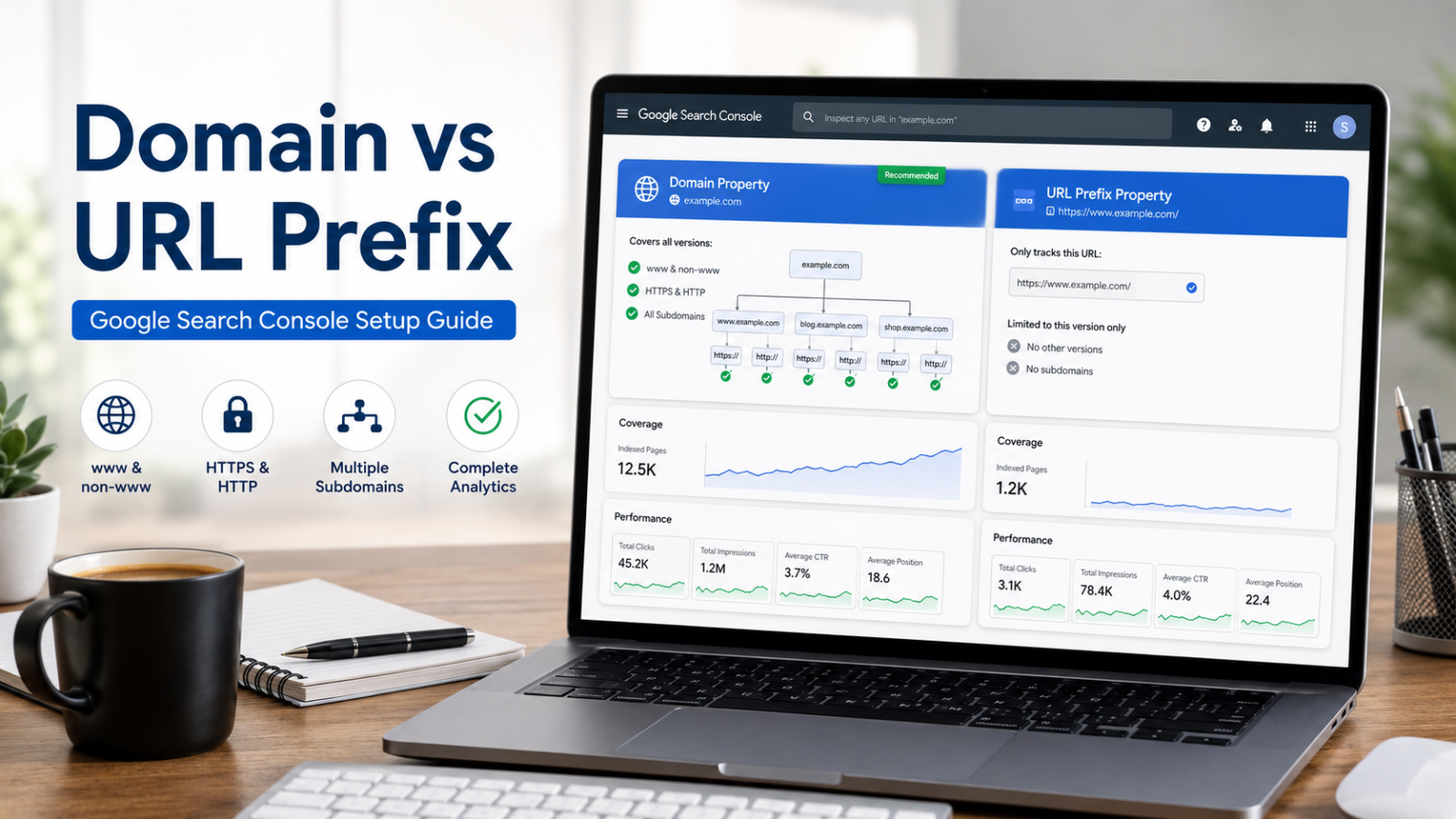
The difference between Domain and URL Prefix in Google Search Console is that a Domain property tracks all versions of a website including www, non-www, HTTP, HTTPS, and subdomains, while a URL Prefix property only tracks a specific URL path. For most websites, Domain property is recommended because it provides complete and unified SEO data.
What Is a Property in Google Search Console?
A property in Google Search Console is simply how Google defines your website inside its system.
Depending on how you configure it, a property can represent:
- An entire domain (full website)
- A subdomain (like blog.example.com)
- A specific section or URL path
All key SEO data such as:
- Clicks
- Impressions
- Average position
- CTR (Click-through rate)
- Index coverage
- Crawl errors
is collected only for URLs that fall inside the selected property scope.
That’s why choosing the right setup is not just technical, it directly impacts your SEO visibility.
Domain Property: Complete Website Coverage
The Domain property is the most comprehensive option available in Google Search Console.
It automatically includes all variations of your website:
- www and non-www versions
- HTTP and HTTPS
- All subdomains (blog, shop, m., etc.)
Example:
If your domain is example.com, a domain property will track:
- https://example.com
- https://www.example.com
- http://example.com
- https://blog.example.com
All data is combined into one unified view.
How it is verified
Domain properties are verified only through DNS verification, meaning you must add a TXT record in your domain registrar or hosting panel.
It sounds technical, but most hosting providers make this process quick and guided.
When to use Domain property
Choose this option if you want:
- A complete SEO performance overview
- Accurate traffic tracking across all versions
- Long-term SEO scalability
- Clean and unified reporting
In most cases, this is the recommended setup for SEO professionals and business websites.
URL Prefix Property: Focused but Limited Tracking
The URL Prefix property is more specific and only tracks URLs that exactly match the version you enter.
Example:
If you set:https://www.example.com
Google will only track that exact version.
It will NOT include:
- http://example.com
- https://example.com
- https://blog.example.com
Each variation must be added separately if you want full coverage.
Advantages of URL Prefix
- Easier setup
- Multiple verification methods (HTML file, meta tag, Google Analytics, Google Tag Manager, or DNS)
- Useful for tracking specific sections
When to use URL Prefix property
This option makes sense when:
- You only want to track a section (like /blog)
- You manage a subdomain separately
- You don’t have DNS access
- You need quick setup without technical access
Domain vs URL Prefix: Key Differences
| Feature | Domain Property | URL Prefix Property |
|---|---|---|
| Coverage | Full domain (all versions) | Only exact URL entered |
| Includes subdomains | Yes | No |
| HTTP/HTTPS coverage | Yes | No |
| Verification method | DNS only | Multiple methods |
| Data completeness | Full & unified | Partial |
| Best for | SEO-wide tracking | Specific sections |
Common SEO Mistake (Very Important)
One of the most frequent mistakes in Google Search Console setup is creating only a URL Prefix property like:
Later, website owners discover that traffic from:https://example.com (non-www version)
was never recorded.
This happens because Google was indexing multiple versions, but only one was being tracked.
How to check this issue quickly:
Search on Google:
site:example.comsite:www.example.com
If both return results, your website has multiple indexed versions and you should be using a Domain property.
Can You Use Both Domain and URL Prefix?
Yes, and in some cases it is actually useful.
You can:
- Use Domain property for full SEO overview
- Use URL Prefix property for deeper analysis of specific sections
However, avoid relying only on multiple prefix properties, it fragments your data and makes SEO analysis harder.
How to Verify Domain Property (Step-by-Step)
- Select Domain property in Search Console
- Enter your domain name
- Copy the provided DNS TXT record
- Add it in your domain registrar (GoDaddy, Namecheap, Hostinger, etc.)
- Click Verify in Search Console
Usually verification is instant, but sometimes it can take up to 24-48 hours.
What If You Chose the Wrong Property?
If you initially selected the wrong type, don’t worry.
- You cannot convert a URL Prefix into a Domain property
- But you can create a new Domain property anytime
- Your old data remains safe in the original property
The only difference is that future reporting becomes more accurate and complete.
SEO Best Practice (Expert Recommendation)
From an SEO perspective, the best practice is clear:
Always start with a Domain property unless you have a specific reason not to.
It ensures:
- Accurate ranking data
- Complete indexing visibility
- Reliable traffic reporting
- Better SEO decision-making
This is exactly why most SEO agencies prefer Domain setup during onboarding.
Frequently Asked Questions
What is the difference between domain and URL prefix in Search Console?
The domain property collects data from all versions of your website: www and non-www, HTTP and HTTPS, and all subdomains. The URL prefix property only collects data from URLs that begin exactly with the address you enter, respecting the protocol. The domain property offers a complete view but can only be verified by DNS. The prefix property is more limited but supports several verification methods.
What type of property should I create in Search Console?
For most websites, domain ownership is the recommended option because it provides complete and unified data for the entire domain. Choosing URL prefix ownership only makes sense if you don’t have DNS access to verify the domain, or if you want to analyze a specific section of the site in isolation.
Can I change the property type once it’s created?
You cannot change the type of an existing property, but you can create a new property of the type you need without losing the data from the previous one. Both properties coexist in your account and you can view them independently. Once the new domain property is created, the data it collects will be more comprehensive than that of the prefix property.
How do I verify domain ownership in Search Console?
Domain ownership can only be verified via DNS records. Google provides a TXT code that you must add to your domain’s DNS settings by accessing your domain registrar’s or hosting provider’s control panel. Once added, return to Search Console and click “Verify.” The process usually completes in less than an hour, although Google may take up to 48 hours to confirm.